Game developers and artists are building cinematic worlds and iconic characters — raising the bar for immersive experiences on NVIDIA RTX AI PCs.
At the Game Developers Conference (GDC) in San Francisco this week, NVIDIA announced a suite of updates that streamline AI video generation for concept development and storyboarding on RTX GPUs and the NVIDIA DGX Spark desktop supercomputer.
These announcements include:
- ComfyUI’s new App View with a simplified interface, lowering the barrier for entry for the popular generative AI tool.
- RTX Video Super Resolution available for ComfyUI, a real-time 4K upscaler ideal for video generation — also available for developers as a Python Wheel.
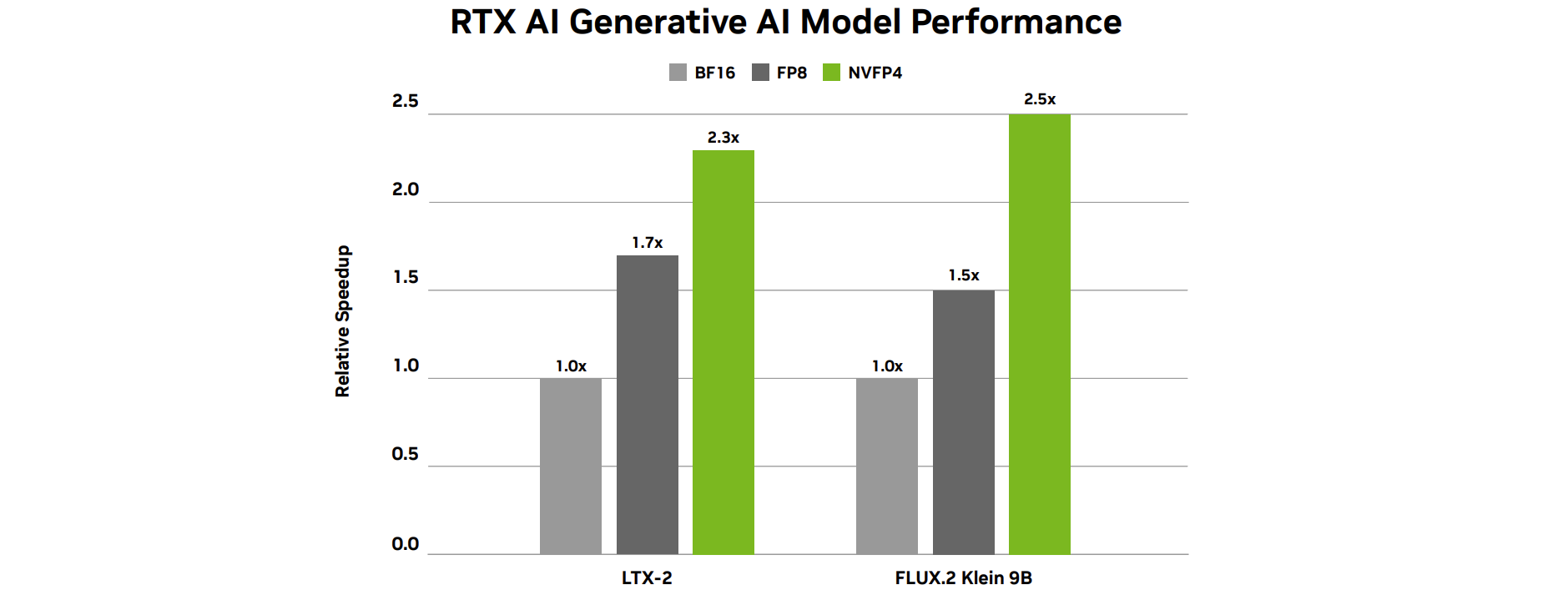
- NVFP4 and FP8 model variants are available today for FLUX.2 Klein, with NVFP4 support for LTX-2.3 coming soon, delivering up to 2.5x performance gains and 60% lower memory usage for both models.
Frictionless Local AI: Collaborate, Optimize, Customize
Many of today’s popular AI applications are making it easier for beginners to try state-of-the-art models directly on their laptop or desktop.
For artists unfamiliar with node graphs, ComfyUI’s new App View presents workflows in a simplified interface. Users only need to enter a prompt, adjust simple parameters and hit generate. The full node-based experience remains available as Node View, and users can seamlessly switch between the two modes.
App View is compatible with the RTX optimizations in ComfyUI. Performance for RTX GPUs is 40% faster since September, and ComfyUI now supports NVFP4 and FP8 data formats natively. All combined, performance is 2.5x faster and VRAM is reduced by 60% with NVIDIA GeForce RTX 50 Series GPUs’ NVFP4 format, and performance is 1.7x faster and VRAM is reduced by 40% with FP8.
At CES in January, NVIDIA announced several models released with NVFP4 and FP8 support. And now more NVFP4 and FP8 models are available — LTX-2.3, with NVFP4 support coming soon, FLUX.2 Klein 4B, and FLUX.2 Klein 9B — directly in ComfyUI. To get started, download the NVFP4 and FP8 checkpoints directly from Hugging Face, load the default workflows in ComfyUI via the Template Browser and replace the default model checkpoint with the newly downloaded checkpoint.
App View mode is available today. Learn more on ComfyUI.
Faster 4K Video Generation
Getting high-quality video outputs often means juggling three constraints: speed, VRAM and control. While many artists ultimately want 4K quality, most prefer to generate smaller, faster previews first, and then upscale them. Today’s upscalers take minutes to upscale a 10‑second clip into 4K resolution.
Now, users can quickly upscale generated video to 4K with NVIDIA RTX Video Super Resolution, available as a node for ComfyUI. RTX Video can be accessed as a standalone node for building video workflows from scratch.
For AI developers, NVIDIA released a free Python package available via the PyPI repository, along with sample code on GitHub and a VFX Python bindings guide, to get started quickly. The package provides programmatic access to the same AI upscaling technology that powers RTX Video, running directly on RTX GPU Tensor Cores to deliver 4K upscaling 30x faster than alternative popular local upscalers, and at a fraction of the VRAM cost. The package is powered by the NVIDIA Video Effects software development kit.
Ready to get started with ComfyUI? Check out the latest NVIDIA Studio Sessions tutorial hosted by visual effects artist Max Novak for a guided walkthrough:
#ICYMI: The Latest Updates for RTX AI PCs at GDC
🎉Join NVIDIA at GTC, March 16-19 in San Jose! Check out “Create Generative AI Workflow for Design and Visualization in ComfyUI” on March 17, for a training session led by NVIDIA 3D workflow specialists focused on building RTX-accelerated generative workflows for images, video, 3D, and PBR materials. Register today and explore the session catalog.
💡LTX Desktop is a fully local, open-source video editor running directly on the LTX engine, optimized for NVIDIA GPUs and compatible hardware.
🦥 LM Link connects separate devices running LM Studio, allowing models to run on remote machines as if they were local. It’s ideal for users wanting to run an agent on their laptop while still accessing free and private AI, powered by their DGX Spark or RTX desktop. Learn how to run LM Studio on DGX Spark.
🎮On Tuesday, March 31, as part of the next opt-in NVIDIA App beta, overrides for NVIDIA DLSS 4.5 Dynamic Multi Frame Generation and DLSS 4.5 Multi Frame Generation 6x Mode will be released for GeForce RTX 50 Series owners. Learn about NVIDIA news at GDC.
🤖Next month, a new NVIDIA RTX Remix update will introduce Advanced Particle VFX, enabling modders to create a wide array of particle effects that further improve image quality, detail and immersion.
🦄Topaz Labs has collaborated with NVIDIA to optimize NeuroStream for NVIDIA GPUs — a proprietary VRAM optimization that allows complex AI models to run on consumer hardware.
📃Microsoft has introduced support for VoiceMod, one of the first apps to enable Windows ML for GPU inference, significantly improving performance voice quality compared with CPUs.
Plug in to NVIDIA AI PC on Facebook, Instagram, TikTok and X — and stay informed by subscribing to the RTX AI PC newsletter. Follow NVIDIA Workstation on LinkedIn and X.
See notice regarding software product information.