Turning a simulation idea into a working application means assembling assets, connecting physics and rendering, and checking that the scene behaves as intended. Developers are combining frontier AI models with NVIDIA Omniverse libraries to help carry out that work — building applications for exploring scenarios, investigating failures and improving designs.
Developers direct AI agents through natural-language instructions, review results and guide changes. Omniverse libraries provide GPU-accelerated physics, rendering and sensor simulation capabilities.
Explore the projects below to see frontier AI models such as GPT-6 Astra at work, and check back for new examples from NVIDIA teams and developers across the ecosystem.
Physical AI Paves the Path to Autonomous Industrial Operations 🔗
AI agents powered by frontier models pave the way to autonomous operations. They use industrial tools and engineering data to help engineers build digital twins that test plans and processes and evaluate operational decisions.
Falkor, a KONGSBERG company, shows how this works in practice. The company’s Falkor Surface platform lets customers turn their computer-aided design and engineering data into facility-scale digital twins using the GPT-6 Astra model. The platform uses NVIDIA Omniverse libraries and NVIDIA RTX PRO 6000 Server Edition GPUs on Microsoft Azure to enable advanced physics simulation.
AI agents built on Falkor’s agentic engine understand dense technical documentation, spatial relationships and real-world physics. Engineers can create and test plans in simulation before traveling on site, reducing costly delays and mistakes. They can also inspect equipment and check clearances in a shared view.
Read Falkor’s article and watch the livestream for a closer look at how the company builds these tools and checks the agents’ work.
Build a Robot Pick-and-Place Simulation With SimReady Assets 🔗
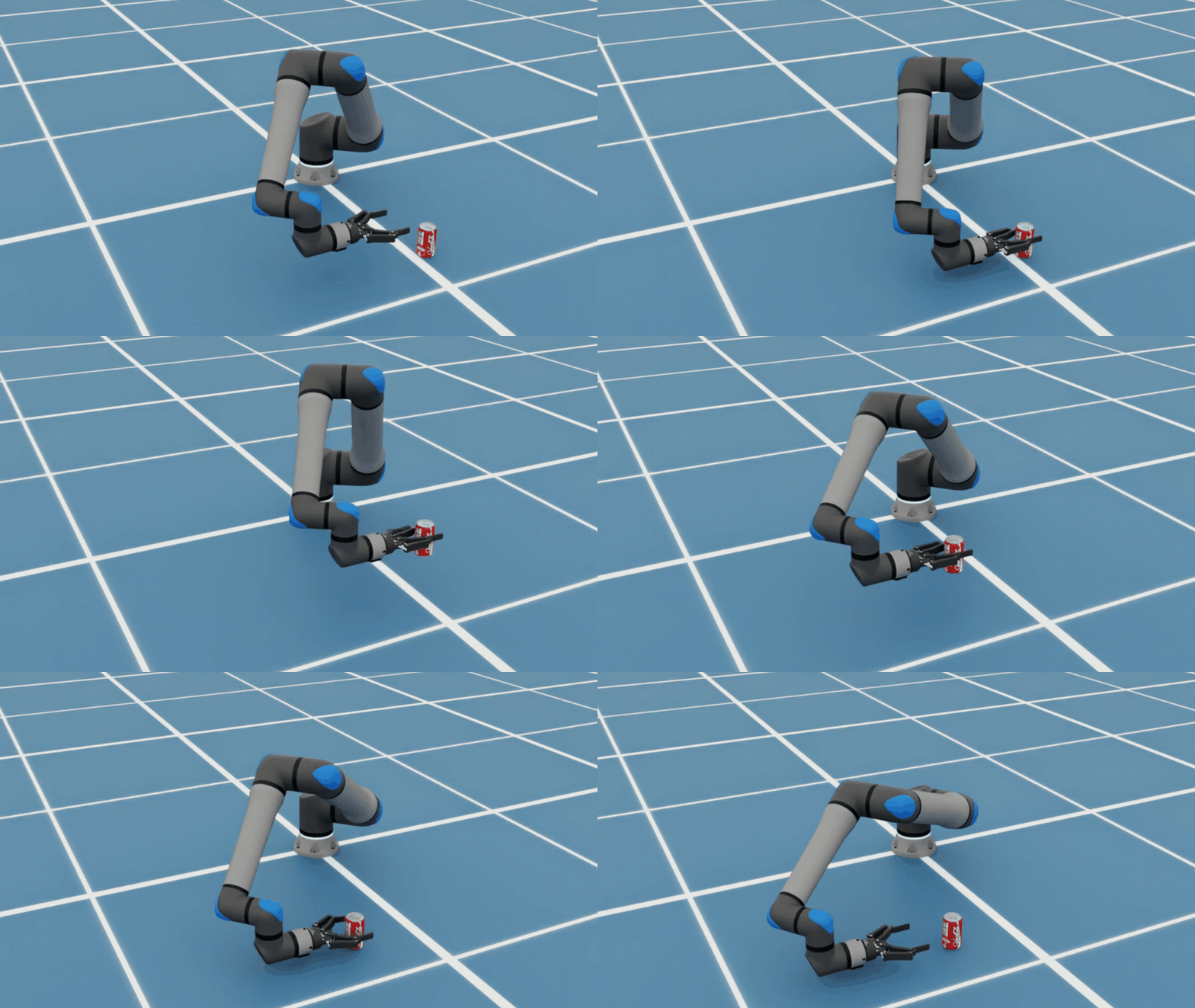
Getting a robot model into a scene is only the start. Developers also need to assemble its components, add controls and check whether it can complete a task.
NVIDIA developers Dillon Bailey and Rishabh Chadha used 3D assets from the SimReady Central library to build a pick-and-place simulation of a robot moving a can using the NVIDIA Isaac Sim framework. They directed an agent equipped with GPT-6 Sol and Isaac Sim skills to assemble the scene and generate pick-and-place controls.
Testing the assembled scene shows how the assets work together, from joint movement and contact behavior to the gripper’s ability to hold, move and release the can. With that baseline in place, developers can adjust object positions and motion paths and repeat the tests to evaluate how each change affects the task.
Follow the walkthrough to assemble and test a pick-and-place simulation in Isaac Sim, with sample agent prompts and checks for robot movement and grasp behavior.
Build a Voice-Controlled VR Simulation With SimReady Assets 🔗
Bringing 3D assets into virtual reality (VR) requires more than rendering a scene. Objects need to respond to controllers and behave as expected when grabbed, moved or released.
NVIDIA Omniverse community developer Michael Wagner took on this challenge. He directed GPT-6 Astra to use Blender software to model a study environment from two reference images, balancing visual quality with efficient performance in VR.
He then used Claude Code to build an application that lets users find SimReady Central assets by voice and interact with them in an immersive VR scene. The Claude Code agent worked for about eight hours, and Wagner built the application over a weekend using an NVIDIA RTX 6000 Ada workstation and a Meta Quest 3 VR headset.
The application ran on NVIDIA Omniverse libraries: ovstage shared the OpenUSD scene, ovrtx rendered it, ovxr enabled VR and ovphysx ran physics. Wagner later built a second version with ovnewton, which integrates with ovstage, to compare the physics libraries.
The biggest challenge for Wagner was checking what happened inside the headset. Automated tests missed problems he could feel, including objects shaking when grabbed. Wagner reported the symptoms, guided the agent through changes and verified the interaction himself. Updating the grab control once per frame resolved the shaking. His takeaway: Give agents renders and logs to inspect, then check the experience directly.
Explore his open source demo for build instructions, a starting prompt and reusable agent skills.
Send Microducks on Rounds in a Simulated Hospital 🔗
Before adapting a robot to a new environment, developers need to test whether its walking policy — the AI that controls how it moves — can keep it stable in that setting.
AI developer Maziyar Panahi directed Claude Code, using Claude Opus 5.5, to assemble an intensive care unit from 13 NVIDIA SimReady hospital assets and test Microduck robots inside it. The assets came with Newton physics settings, so Panahi didn’t have to model the furniture or create collision geometry from scratch. The Newton physics engine also helped replicate the ward so hundreds of copies could run together on one NVIDIA RTX PRO 6000 GPU.
When the cloud containers lacked graphics support, Panahi and the Claude Code agent separated simulation from rendering, recording robot poses in the cloud and rendering them locally. They also treated the furniture as static collision objects, which enabled larger runs within the solver’s limits.
The robots walked using AI they had already been trained on and followed preset points along a route. Panahi checked how many robots remained upright: In a 256-ward run, 766 of 768 Microducks were still standing after 14 simulated seconds. He said the agent’s work took about two hours.
Explore the open source demo for a starter prompt, checks and instructions to begin with one ward on a CPU, then scale to hundreds on an NVIDIA GPU.
Create Editable 3D Assets With Houdini and AI Agents 🔗
Creating animated 3D content requires connecting modeling, simulation, materials and rendering. Nick Scarcella, a senior technical artist on NVIDIA’s BondLab team, directed AI agents — primarily using Claude — to work with CUDA libraries and Isaac Sim to create animations. The BondLab team uses SideFX Houdini and the NVIDIA ovrtx library to develop materials, lighting and the final rendered appearance.
In one experiment, Scarcella guided Astra to recreate an OP-1 portable synthesizer using product images, manuals and technical direction. He exported the model into the OpenUSD framework, tested it in Houdini and Blender, then used Astra and Opus to refine details before adjusting materials and textures for ovrtx rendering.
Scarcella also used a publicly shared robot-hand checkpoint in Isaac Sim, directing the motion and developing materials and lighting in Houdini with Claude’s assistance. Working with team member Steven Dvornik, the team created an “Echos” visualization: translucent versions of the hand overlap and merge into a single hand animation, offering a visual interpretation of robot training.
Figure: An artistic visualization of simulated robot-hand motion, developed with AI assistance and Houdini’s materials and lighting tools.
These workflows bring agent-assisted creation into existing artist tools, giving teams editable content they can inspect, refine and render across applications.
Explore Scarcella’s Houdini MCP tools and agent skill.
Test Robotic Disassembly With Computer-Aided Design and Simulation 🔗
Before a robot can disassemble a product, developers need to know whether its tools can reach and remove the parts. Jens Jebens, a senior product manager for OpenUSD at NVIDIA, directed Astra to model a car suspension in PTC Onshape and configure it in NVIDIA Isaac Sim.
Jebens used simulation feedback to revise the tooling, including a wrench designed to reach the suspension’s bolts, and reported successful removal of a suspension component in simulation.
PTC also connects computer-aided design (CAD) with simulation through Onshape’s SimReady Publisher, built with NVIDIA Omniverse libraries. Robotics startup Sensori uses it to transfer its Yuri robot into Isaac Sim, carrying geometry, joints and configuration data so the team can evaluate design changes without repeatedly rebuilding the simulation model.
Explore the Onshape importer guide.
Create an Editable Building Model From Site Scans 🔗
Planning warehouse automation requires a model of the building itself, but shelving and machinery can obscure its structure in site scans. Omniverse brings together real-to-sim tools and agent skills to help developers turn real-world captures into editable starting environments for physical AI simulation.
David Wehr, from NVIDIA’s simulation technology team, built on that work using Astra to develop a workflow for digitally reconstructing a building without its contents. The goal is an editable, simulation-ready building model where developers can add or reposition shelving and machinery to evaluate warehouse layouts and automation plans before making physical changes.
Wehr guided Astra to interpret panoramic photos, create building geometry and align it with point-cloud measurements. OpenUSD stores the models, while Omniverse’s ovrtx library renders results for inspection.
Explore NVIDIA Omniverse agent skills to help agents build with Omniverse libraries.
Test Gas-Turbine Operating Scenarios With a Digital Twin 🔗
Before changing how industrial equipment operates, engineers need a way to explore the consequences. Pradeep Kaushik, a member of the NVIDIA Omniverse developer relations team, directed Astra to build a what-if analysis application around a simulated gas turbine and generator.
The application lets users adjust conditions such as load, ambient temperature and fuel composition, then compare power, efficiency, fuel consumption and equipment response. Six test procedures explore scenarios including load changes, a stuck fuel valve and an exhaust-sensor error.
The prototype gives engineers an interactive way to investigate how operating changes and faults could affect equipment behavior, supporting decisions about which scenarios warrant further testing.
Astra used tools like Cantera for thermochemistry and SciPy for equipment dynamics. The application maps solver results to rotor animation and color-coded temperature, pressure and flow-velocity indicators in a 3D turbine. NVIDIA Omniverse libraries update the scene (ovstage), render it with RTX (ovrtx) and stream the view to the browser (ovstream). Engineers can rotate and zoom the cutaway, switch between indicators, and pause or scrub through a simulated response alongside charts and virtual instruments.
Build Simulation Scenes With Open Source SimReady Assets 🔗
With SimReady Central Library, announced at GTC Berlin, developers can access more than 2,000 simulation-ready USD assets from equipment manufacturers and asset providers for robotics simulations and AI factory digital twins workflows.
Paul Kind, a member of NVIDIA’s Omniverse documentation team, pointed an AI agent to the library and guided scene assembly through conversation. His kitchen scene included 180 placements drawn from 63 unique library assets, alongside 18 custom geometry pieces. Kind reviewed renders produced with Isaac Sim and guided further adjustments.
For robotics and factory workflows, developers can select SimReady assets with the simulation properties embedded to fit their required task then test in an assembled environment.
Find assets in SimReady Central Library, and learn how to contribute.
Stress-Test a Warehouse Simulation at Scale 🔗
A warehouse simulation needs to keep running smoothly as more robot arms, conveyors and boxes fill the scene.
When it slows down, developers need to identify what’s holding it back. Bhavik Sanganee, principal engineer at NVIDIA, used Astra with NVIDIA Omniverse libraries to build a warehouse simulation, increase its complexity and investigate slowdowns.
Performance first fell below the target when the scene doubled in size. Running physics calculations, image rendering and video preparation concurrently restored performance and enabled further scaling.
With 80 conveyors, 40 arms and 800 boxes, the simulation sustained 30 frames per second at full HD resolution during a two-minute test. The arms completed 640 successful box placements.
Doubling the scene again reduced performance. Testing traced the slowdown to the physics and robot-control pipeline, giving Sanganee a specific area to improve.
Start building with NVIDIA Omniverse libraries.
Test Robot Control for Flexible Cable Routing 🔗
In electronics assembly, a robot may need to position a flexible cable around components before plugging it into a port. The cable bends as the robot moves it, and the connector must line up precisely to fit.
Oyindamola Omotuyi, robotics technical marketing manager at NVIDIA, directed Astra to build a robot simulation using NVIDIA Isaac Lab, Newton physics and Omniverse rendering with a Robotiq gripper handling the cable.
Astra also developed a reinforcement learning system that combined learned cable-routing movements with position-and-orientation feedback and corrective adjustments for USB-C insertion. The simulation gave Omotuyi a way to test cable handling and connector alignment before moving to physical-robot experiments.
The controller used information supplied directly by the simulation. Next steps include testing a friction-held grasp and using information a physical robot could obtain from cameras and sensors.
Get started with robot learning in NVIDIA Isaac Lab.
Turn Robot Computer-Aided Design Into a SimReady Asset 🔗
Before testing whether a robot can pick up and move a box, developers need a simulation model with joints that move correctly and with grippers that can hold the object. A computer-aided design (CAD) model provides the robot’s shape, but it still needs physics properties to perform the task.
Using an ABB Robotics YuMi robot, developers directed Astra with NVIDIA Omniverse content libraries to convert CAD files into OpenUSD, match the robot’s appearance to reference images, and configure joints and collision geometry. They checked the asset against SimReady Foundation requirements before testing it in NVIDIA Isaac Sim.
Both arms and grippers completed four cube pick-and-place cycles, using simulated finger contact and friction. These tests demonstrated behavior under the simulated conditions — estimated physical properties were not calibrated against the real robot.
Follow the five-step SimReady tutorial.
Build a Humanoid Simulator for a Warehouse Environment 🔗
Explore a gamified, physics-based control of a humanoid robot in first- and third-person view.
Before automating warehouse tasks, developers need an interactive simulation environment to explore task behavior and evaluate how the work gets done. Frank DeLise, Omniverse product manager at NVIDIA, used Astra to turn a SimReady warehouse and humanoid robot into an interactive simulator with first- and third-person views.
DeLise directed Astra to connect NVIDIA Omniverse libraries for physics (ovphysx), scene updates (ovstage), rendering (ovrtx) and the user interface (ovui). He also used Astra with SimReady (simready-foundation) to create the physical scene in simulation. Astra then generated animation and application code to bring those capabilities together.
Learn how to prepare and validate SimReady robot assets with frontier AI models and NVIDIA Omniverse libraries.
Connect an Autonomous-Driving Testing Workflow 🔗
Changing a scene, sensor or driving model can significantly affect autonomous-vehicle simulations. Doyub Kim, a manager on the simulation technology team at NVIDIA, asked Astra to build Zero to Alpamayo — a reusable simulation environment based on San Francisco’s Market Street.
Kim directed Astra to map out the workflow, then connect asset creation, traffic, Omniverse RTX sensor simulation and Alpamayo driving in stages, checking each integration. The resulting prototype was a testing ground for comparing models and tracing how scene or sensor changes affect downstream driving behavior. A separate Cosmos3-Nano experiment varied weather and lighting in recorded simulation videos, allowing Kim to compare the driving model’s responses to the same scenario under different conditions.
Use Sensor Differences to Create and Improve Digital Twins 🔗
Comparing recorded and simulated camera and lidar outputs gives developers key performance indicator-based feedback for refining a scene.
To test robots and autonomous vehicles, developers need to know how closely simulated sensors match real ones. Ashley Reid, who works on RTX sensor validation at NVIDIA, directed Astra and Claude Fable 5 agents to compare ovrtx camera and raw LiDAR outputs with recorded data. The agents created two digital twins from scratch and improved two existing ones.
Over about three days, Reid guided an iterative workflow in which agents measured differences, created or modified OpenUSD scenes, and checked the results. Changes addressed missing objects, geometry and materials, with acceptance depending on camera and LiDAR metrics. This gives developers a way to use measured discrepancies to guide scene creation and improvement.
Start by rendering an OpenUSD scene with the ovrtx minimal Python example, then define a sensor measure to compare with recorded data.
Robo Olympics: Test Robot Skills With Simulation 🔗
Teaching robots new movements means checking whether those actions work under physical constraints. Tae Kim, who leads NVIDIA Omniverse engineering and product, used sports videos and natural-language instructions to guide Astra in building Robo Olympics, an experimental project that tests simulated Unitree G1 humanoids performing sports movements.
Under Kim’s direction, Astra built controllers and refined them through physics trials. Newton Physics Engine simulated behavior, the open source NVIDIA Warp framework accelerated calculations and ovrtx rendered scenes and virtual-camera images. In one experiment, the robot cleared a single hurdle in 64 of 100 simulation trials. The trials gave Kim feedback for improving the robot’s timing and control.
Watch Kim explore building simulations with Astra and NVIDIA Omniverse libraries.
Bring the International Space Station Into the Browser 🔗
Turning 3D models into an application requires connecting assets, live data and an interface. Nic Johns, an engineering director at NVIDIA, prompted Astra to assemble NASA assets into an OpenUSD International Space Station model with telemetry. Johns built the application with a single prompt, then used a follow-up prompt to shift the scene to Earth’s daytime side so the planet was visible.
The workflow used Blender for asset preparation and Omniverse libraries for rendering (ovrtx), scene runtime (ovstage) and streaming (ovstream). The application brings 3D models and operational data into the browser, with Johns guiding its development through prompts and corrections.
Try the Omniverse Real-Time Viewer skill.
Turn Captured Rooms Into Testing Environments 🔗
A digitally reconstructed room needs editable objects and accurate physical behavior before developers can test interactions. Chirag Majithia, from the Isaac engineering applications team at NVIDIA, directed Astra to turn stereo camera captures into an editable OpenUSD studio.
The workflow combined PyCuSFM, FoundationStereo and nvblox for reconstruction, with user review guiding object selection and placement. Astra assembled generated and Blender-authored assets and used USD Content Agents to configure how objects move and interact in simulation. Isaac Sim tests guided collision and contact revisions for doors and drawers. The studio connects captured geometry to interaction testing, making gaps and object behavior easier to inspect.
Have a simulation idea? Explore NVIDIA Omniverse libraries to start building with an AI agent.