country_code

Feel the Need … for Speed as ‘Top Goose’ Debuts In the NVIDIA Studio

Tribute to fast-flying aviators, ‘Top Goose’ takes to the sky, accelerated by development in Omniverse Machinima.
by Stanley Tack

Editor’s note: This post is part of our weekly In the NVIDIA Studio series, which celebrates featured artists, offers creative tips and tricks, and demonstrates how NVIDIA Studio technology accelerates creative workflows. 

You can be my wing-wing anytime.

This week In the NVIDIA Studio takes off with the debut of Top Goose, a short animation created with Omniverse Machinima and inspired by one of the greatest fictional pilots to ever grace the big screen.

The project was powered by PCs using the same breed of GPU that has produced every Best Visual Effects nominee at the Academy Awards for 14 years: multiple systems with NVIDIA RTX A6000 GPUs and an NVIDIA Studio laptop — the Razer Blade 15 with a GeForce RTX 3070 Laptop GPU.

The team took Top Goose from concept to completion in just two weeks. It likely would’ve taken at least twice as long without the remote collaboration NVIDIA Omniverse offers NVIDIA RTX and GeForce RTX users.


Built to showcase the #MadeinMachinima contest, the inspiration was simple. One of the NVIDIANs involved in the project, Dane Johnston, succinctly noted, “How do you get a midcentury legionnaire on an aircraft carrier and what would he be doing? He’d be getting chased by a goose, of course.”

Ready to Take-Off

Johnston and fellow NVIDIANs Dave Tyner, Matthew Harwood and Terry Naas began the project by prepping models for the static assets in Autodesk 3ds Max. Several of the key models came from TurboSquid by Shutterstock, including the F14 fighter jet, aircraft carrier, goose and several props.
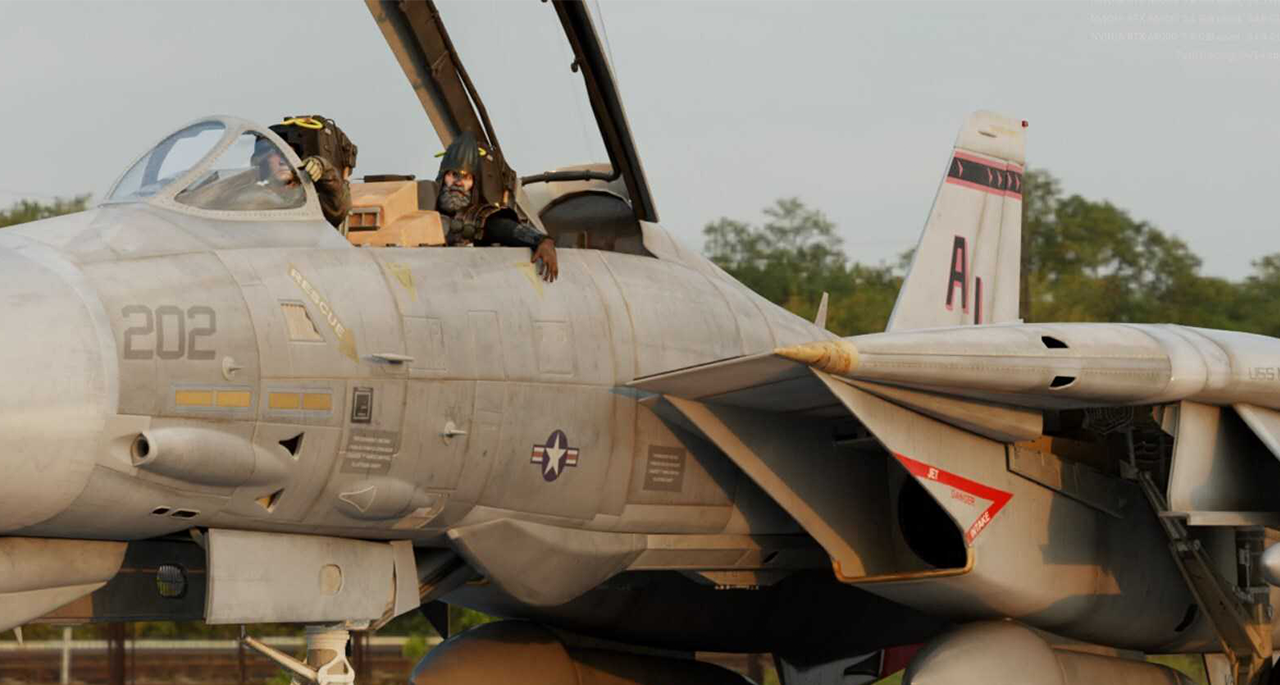
High-quality models such as the F14 fighter jet, courtesy of TurboSquid by Shutterstock, are available to all Omniverse users.

TurboSquid has a huge library of 3D models to begin creating within Omniverse. Simply drag and drop models into Omniverse and start collaborating with team members — regardless of the 3D application they’re using or where they’re physically located.

Tyner could easily integrate 3D models he already owned by simply dropping them into the scene from the new Asset Store browser in Omniverse.
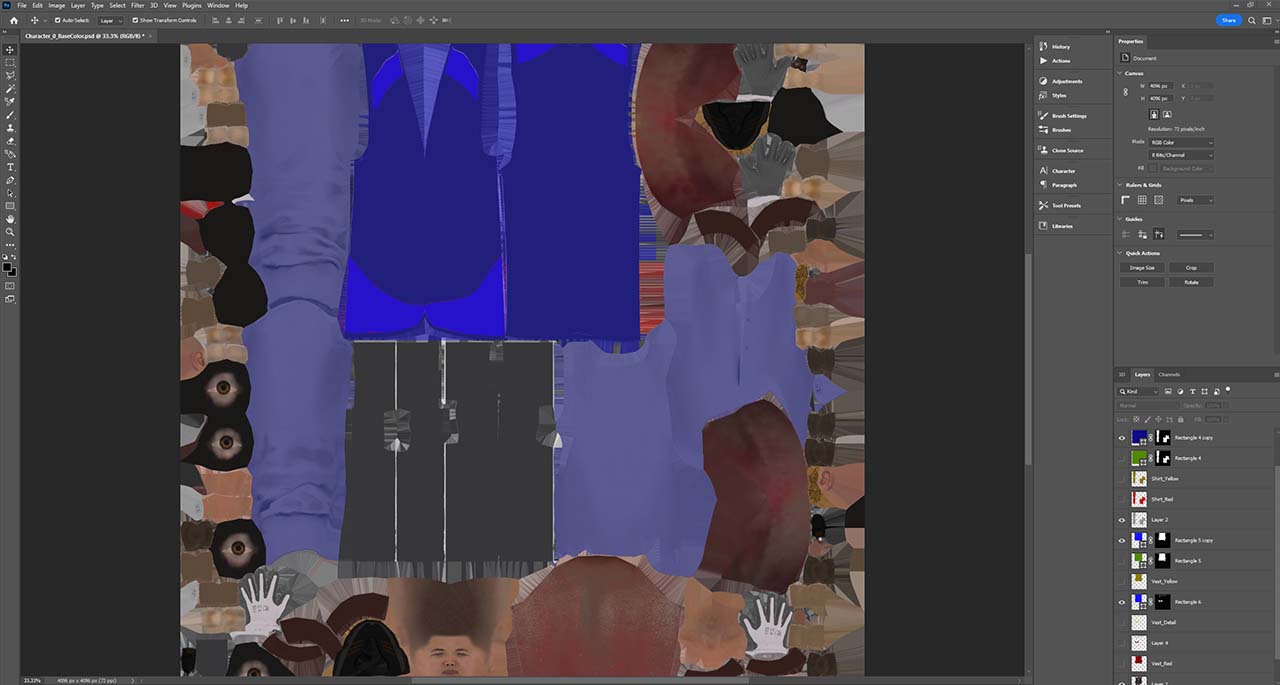
Texture details were added within Omniverse in real time using Adobe Photoshop.

The team worked seamlessly between apps within Omniverse, in real time, including Adobe Photoshop.

From there, Adobe Photoshop was used to edit character uniforms and various props within the scene, including the Top Goose badge at the end of the cinematic.

Animators, Mount Up!

Once models were ready, animation could begin. The team used Reallusion’s iClone Character Creator Omniverse Connector to import characters to Machinima.

Omniverse-ready USD animations from Reallusion ActorCore were dragged and dropped into the Omniverse Machinima content browser for easy access.


The models and animations were brought into Machinima by Tyner, where he used the retargeting function to instantly apply the animations to different characters, including the top knight from Mount & Blade II: Bannerlord — one of the hundreds of assets included with Omniverse.

Tyner, a generalist 3D artist, supplemented the project by creating custom animations from motion capture using an Xsens suit that was exported to FBX. Using a series of Omniverse Connectors, he brought the FBX files into Autodesk 3ds Max and ran a quick script to create a rudimentary skin.

Then, Tyner sent the skinned character and animation into Autodesk Maya for USD skeleton export to Machinima, using the Autodesk Maya Connector. The animation was automatically retargeted onto the main character inside Machinima. Once the data was captured, the entire mocap workflow took only a few minutes using NVIDIA Studio tools.

If Tyner didn’t have a motion-capture suit, he could have used Machinima’s AI Pose Estimation — a tool within Omniverse that lets anyone with a camera capture movement and create a 3D animation.

Static objects were all animated in Machinima with the Curve Editor and Sequencer. These tools allowed the team to animate anything they wanted, exactly how they wanted. For instance, the team animated the fighter jet barrel rolls with gravity keyed on a y-axis — allowing gravity to be turned on and off.

This technique, coupled with NVIDIA PhysX, also allowed the team to animate the cockpit scene with the flying bread and apples simply by turning off the gravity. The objects in the scene all obeyed the laws of physics and flew naturally without any manual animation.

The team collaborates virtually to achieve realistic animations using the Omniverse platform.

Animating the mighty wings of the goose was no cheap trick. While some of the animations were integrated as part of the asset from TurboSquid, the team collaborated within Omniverse to animate the inverted scenes.

Tyner used Omniverse Cloud Simple Share Early Access to package and send the entire USD project to Johnston and Harwood, NVIDIA’s resident audiophile. Harwood added sounds like the fly-bys and goose honks. Johnston brought the Mount & Blade II: Bannerlord character to life by recording custom audio and animating the character’s face with Omniverse Audio2Face.

Traditional audio workflows usually involve multiple pieces of audio recordings sent piecemeal to the animators. With Simple Share, Tyner packaged and sent the entire USD project to Harwood, who was able to add audio directly to the file and return it with a single click.

Revvin’ Up the Engine

Working in Omniverse meant the team could make adjustments and see the changes, with full-quality resolution, in real time. This saved the team a massive amount of time by not having to wait for single shots to render out.

The 3D artist team works together to finish the scene in Omniverse Machinima and Audio2Face.

With individuals working hundreds of miles apart, the team leveraged Omniverse’s collaboration capabilities with Omniverse Nucleus. They were able to complete set dressing, layout and lighting adjustments in a single real-time jam session.


The new constraints system in Machinima was integral to the camera work. Tyner created the shaky camera that helps bring the feeling of being on an aircraft carrier by animating a shaking ball in Autodesk 3ds Max, bringing it in via its Omniverse Connector, and constraining a camera to it using OmniGraph.

Equally important are the new Curve Editor and Sequencer. They gave the team complete intuitive control of the creative process. They used Sequencer to quickly and easily choreograph animated characters, lights, constraints and cameras — including field of view and depth of field.

With all elements in place, all that was left was the final render — conveniently and quickly handled using the Omniverse RTX renderer and without any file transfers in Omniverse Nucleus.

Tyner noted, “This is the first major project that I’ve done where I was never blocked. With Omniverse, everything just worked and was really easy to use.”

Not only was it easy to use individually, but Omniverse, part of the NVIDIA Studio suite of software, let this team of artists easily collaborate while working in and out of various apps from multiple locations.

Top Prizes in the #MadeinMachinima Contest

Top Goose is a showcase for #MadeinMachinima. The contest, which is currently running and closes June 27, asks artists to build and animate a cinematic short story with the Omniverse Machinima app for a chance to win RTX-accelerated NVIDIA Studio laptops.

RTX creators everywhere can remix and animate characters from Squad, Mount & Blade II: Bannerlord, Shadow Warrior 3, Post Scriptum, Beyond the Wire and Mechwarrior Mercenaries 5 using the Omniverse Machinima app.

Experiment with the AI-enabled tools like Audio2Face for instant facial animation from just an audio track; create intuitively with PhysX-powered tools to help you build as if building in reality; or add special effects with Blast for destruction and Flow for smoke and fire. You can use any third-party tools to help with your workflow, just assemble and render your final submission using Omniverse Machinima.

Learn more about NVIDIA Omniverse, including tips, tricks and more on the Omniverse YouTube channel. For additional support, explore the Omniverse forums or join the Discord server to chat with the community. Check out the Omniverse Twitter, Instagram and Medium page to stay up to date.

Follow NVIDIA Studio on Instagram, Twitter and Facebook. Access a wide range of tutorials on the Studio YouTube channel and get updates in your inbox by subscribing to the Studio newsletter.
Advancing Open Source AI, NVIDIA Donates Dynamic Resource Allocation Driver for GPUs to Kubernetes Community

In addition, NVIDIA announced at KubeCon Europe a confidential containers solution for GPU-accelerated workloads, updates to the NVIDIA KAI Scheduler and new open source projects to enable large-scale AI workloads.
by Justin Boitano

Artificial intelligence has rapidly emerged as one of the most critical workloads in modern computing.

For the vast majority of enterprises, this workload runs on Kubernetes, an open source platform that automates the deployment, scaling and management of containerized applications.

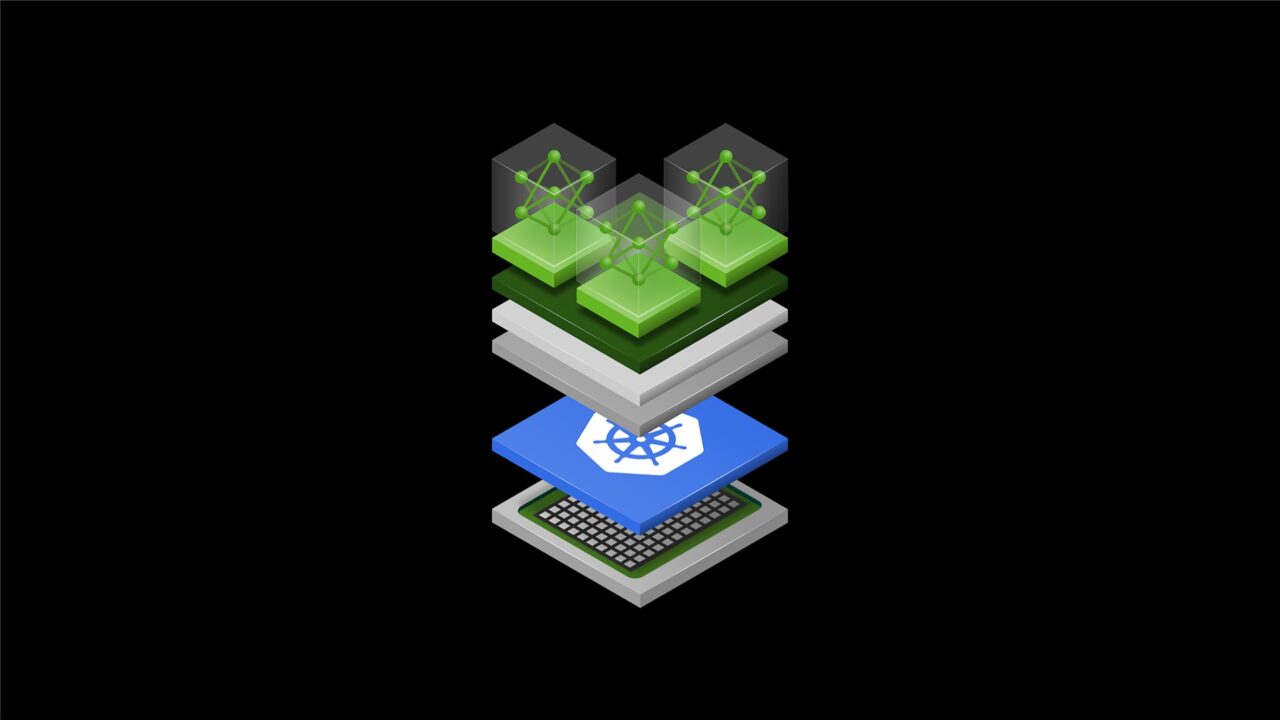
To help the global developer community manage high-performance AI infrastructure with greater transparency and efficiency, NVIDIA is donating a critical piece of software — the NVIDIA Dynamic Resource Allocation (DRA) Driver for GPUs — to the Cloud Native Computing Foundation (CNCF), a vendor-neutral organization dedicated to fostering and sustaining the cloud-native ecosystem. 

Announced today at KubeCon Europe, CNCF’s flagship conference running this week in Amsterdam, the donation moves the driver from being vendor-governed to offering full community ownership under the Kubernetes project. This open environment encourages a wider circle of experts to contribute ideas, accelerate innovation and help ensure the technology stays aligned with the modern cloud landscape. 

“NVIDIA’s deep collaboration with the Kubernetes and CNCF community to upstream the NVIDIA DRA Driver for GPUs marks a major milestone for open source Kubernetes and AI infrastructure,” said Chris Aniszczyk, chief technology officer of CNCF. “By aligning its hardware innovations with upstream Kubernetes and AI conformance efforts, NVIDIA is making high-performance GPU orchestration seamless and accessible to all.”

In addition, in collaboration with the CNCF’s Confidential Containers community, NVIDIA has introduced GPU support for Kata Containers, lightweight virtual machines that act like containers. This extends hardware acceleration into a stronger isolation, separating workloads for increased security and enabling AI workloads to run with enhanced protection so organizations can easily implement confidential computing to safeguard data.

Simplifying AI Infrastructure

Historically, managing the powerful GPUs that fuel AI within data centers required significant effort. 

This contribution is designed to make high-performance computing more accessible. Key benefits for developers include:

  • Improved Efficiency: The driver allows for smarter sharing of GPU resources, delivering effective use of computing power, with support of NVIDIA Multi-Process Service and NVIDIA Multi-Instance GPU technologies.
  • Massive Scale: It provides native support for connecting systems together, including with NVIDIA Multi-Node NVlink interconnect technology. This is essential for training massive AI models on NVIDIA Grace Blackwell systems and next-generation AI infrastructure.
  • Flexibility: Developers can dynamically reconfigure their hardware to suit their needs, changing how resources are allocated on the fly.
  • Precision: The software supports fine-tuned requests, allowing users to ask for the specific computing power, memory settings or interconnect arrangement needed for their applications.

A Collaborative, Industry-Wide Effort

NVIDIA is collaborating with industry leaders — including Amazon Web Services, Broadcom, Canonical, Google Cloud, Microsoft, Nutanix, Red Hat and SUSE — to drive these features forward for the benefit of the entire cloud-native ecosystem.

“Open source will be at the core of every successful enterprise AI strategy, bringing standardization to the high-performance infrastructure components that fuel production AI workloads,” said Chris Wright, chief technology officer and senior vice president of global engineering at Red Hat. “NVIDIA’s donation of the NVIDIA DRA Driver for GPUs helps to cement the role of open source in AI’s evolution, and we look forward to collaborating with NVIDIA and the broader community within the Kubernetes ecosystem.”

“Open source software and the communities that sustain it are a cornerstone of the infrastructure used for scientific computing and research,” said Ricardo Rocha, lead of platforms infrastructure at CERN. “For organizations like CERN, where efficiently analyzing petabytes of data is essential to discovery, community-driven innovation helps accelerate the pace of science. NVIDIA’s donation of the DRA Driver strengthens the ecosystem researchers rely on to process data across both traditional scientific computing and emerging machine learning workloads.”

Expanding the Open Source Horizon

This donation is just part of NVIDIA’s broader initiatives to support the open source community. For example, NVSentinel — a system for GPU fault remediation — and AI Cluster Runtime, an agentic AI framework, were announced at GTC last week.

In addition, NVIDIA announced at GTC new open source projects including the NVIDIA NemoClaw reference stack and NVIDIA OpenShell runtime for securely running autonomous agents. OpenShell provides fine-grained programmable policy security and privacy controls, and natively integrates with Linux, eBPF and Kubernetes.

NVIDIA also today announced that its high-performance AI workload scheduler, the KAI Scheduler, has been onboarded as a CNCF Sandbox project — a key step toward fostering broader collaboration and ensuring the technology evolves alongside the needs of the wider cloud-native ecosystem. Developers and organizations can use and contribute to the KAI Scheduler today.

NVIDIA remains committed to actively maintaining and contributing to Kubernetes and CNCF projects to help meet the rigorous demands of enterprise AI customers. 

In addition, following the release of NVIDIA Dynamo 1.0, NVIDIA is expanding the Dynamo ecosystem with Grove, an open source Kubernetes application programming interface for orchestrating AI workloads on GPU clusters. Grove, which enables developers to express complex inference systems in a single declarative resource, is being integrated with the llm-d inference stack for wider adoption in the Kubernetes community. 

Developers and organizations can begin using and contributing to the NVIDIA DRA Driver today.

Visit the NVIDIA booth at KubeCon to see live demos of this technology in action.

NVIDIA GTC 2026: Live Updates on What’s Next in AI

Rolling coverage from San Jose, including NVIDIA CEO Jensen Huang’s keynote, news highlights, live demos and on‑the‑ground color through March 19.
by NVIDIA Writers

GTC Spotlights NVIDIA RTX PCs and DGX Sparks Running Latest Open Models and AI Agents Locally

NVIDIA Nemotron 3 open models unlock fast, private AI agents like OpenClaw; creativity accelerated with RTX-optimized NVFP4 and FP8 visual generative AI models.
by Gerardo Delgado

The paradigm of consumer computing has revolved around the concept of a personal device — from PCs to smartphones and tablets. Now, generative AI — particularly OpenClaw — has introduced a new category: agent computers. These devices, like the NVIDIA DGX Spark desktop AI supercomputer or dedicated NVIDIA RTX PCs, are ideal for running personal agents — privately and for free. 

NVIDIA GTC, running this week, is showcasing a host of agentic AI announcements including:

  • New open models for local agents, including NVIDIA Nemotron 3 Nano 4B and Nemotron 3 Super 120B, and optimizations for Qwen 3.5 and Mistral Small 4.
  • NVIDIA NemoClaw, an open source stack for OpenClaw that optimizes OpenClaw experiences on NVIDIA devices by increasing security and supporting local models. 
  • Easier fine‑tuning with Unsloth Studio to further improve open model accuracy for agentic workflows.

In-person GTC attendees can swing by the NVIDIA build-a-claw event in the GTC Park, running daily through March 19, from 8 a.m.-5 p.m. NVIDIA experts will help guests customize and deploy a proactive, always-on AI assistant using their device of choice. Whether technical or just curious, participants will name their agent, define its personality and grant it access to the tools it needs — creating a personal assistant reachable from their preferred messaging app.

New Open Models Bring Cloud-Level Quality to Local Agents 

The next generation of local models — with increasingly large context windows — delivers the intelligence to run agents on PC. Combined with richer user context and powerful local tools, these advances are unlocking new possibilities on AI PCs, especially on DGX Spark, with its 128GB of unified memory that supports models with more than 120 billion parameters.

Nemotron 3 Super, released last week, is a 120‑billion‑parameter open model with 12 billion active parameters, designed to run complex agentic AI systems. Nemotron 3 Super is optimal for powering agents on the DGX Spark or NVIDIA RTX PRO workstations. On PinchBench — a new benchmark for determining how well large language models perform with OpenClaw — Nemotron 3 Super scored 85.6%, making it the top open model in its class.

Mistral Small 4, a 119-billion-parameter open model with 6 billion active parameters — 8 billion including all layers — unifies the capabilities of Mistral’s flagship models. Users now have an ultraefficient model optimized for general chat, coding and agentic tasks.

Both of these models run locally on DGX Spark and RTX PRO GPUs.

For GeForce RTX users looking for smaller models, Nemotron 3 Nano 4B is the latest model to join the NVIDIA Nemotron 3 family of open models, providing a compact, capable starting point for building agents and assistants locally on RTX AI PCs. The model is a strong fit for building action-taking conversational personas in games and apps that run on resource-constrained hardware. It’s available across any NVIDIA GPU-enabled system and combines state-of-the-art instruction-following and exceptional tool use with minimal VRAM footprint. 

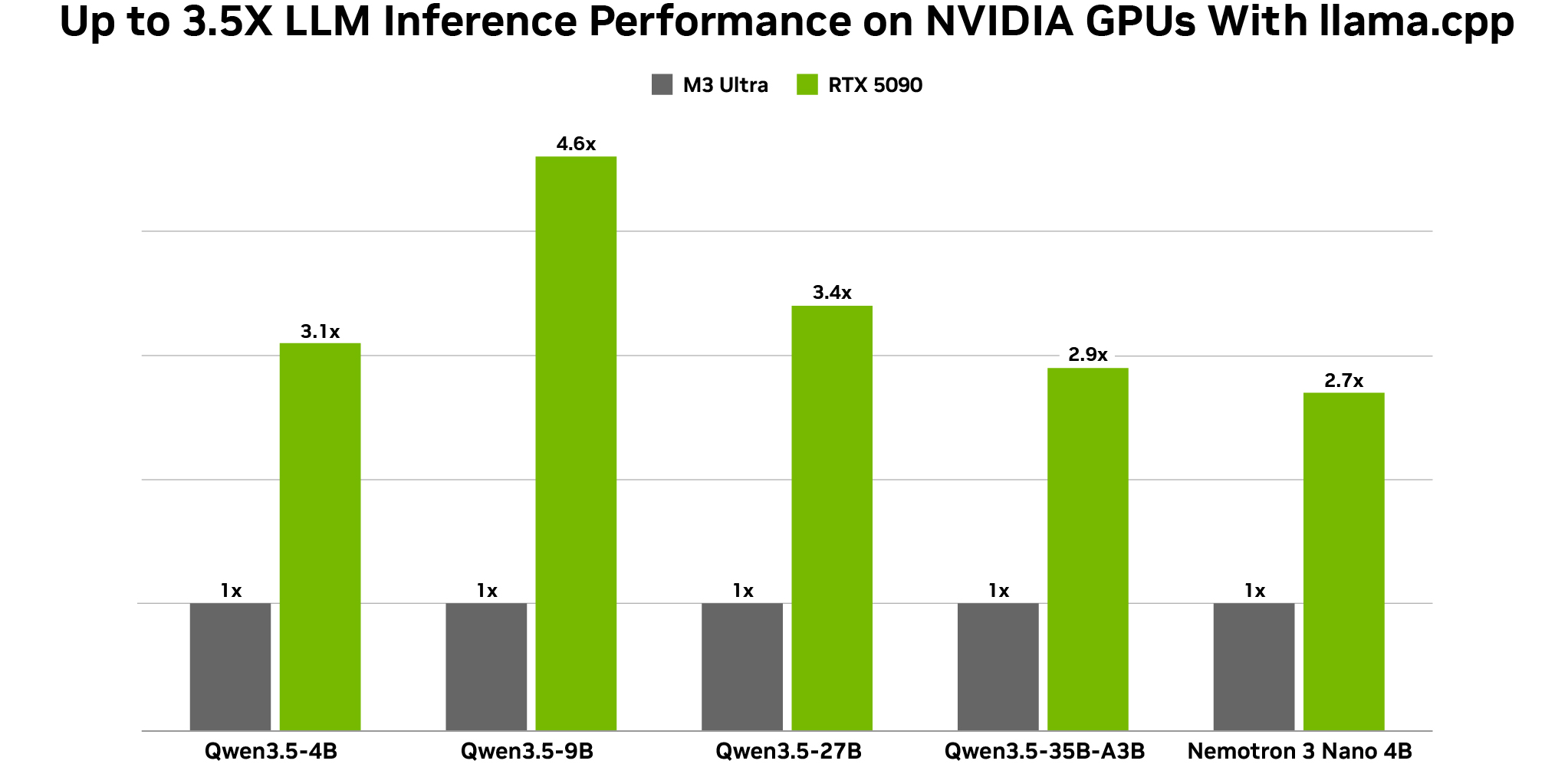
In addition, NVIDIA announced optimizations for Alibaba’s Qwen 3.5 models, which have demonstrated outstanding accuracy (27B, 9B and 4B) and are suited for running local agents on NVIDIA GPUs. The new models natively support vision, multi-token prediction and a large 262,000-token context window. The dense 27-billion-parameter model excels when paired with an RTX 5090 GPU.

All configurations measured using Q4_K_M quantizations BS = 1, ISL = 1024 and OSL = 128 on NVIDIA RTX 5090 and Mac M3 Ultra desktops. Token generation throughput measured on llama.cpp b7789, using the llama-bench tool.

Users can try these models today via Ollama, LM Studio and llama.cpp, with accelerated inference powered by RTX GPUs and DGX Spark. Learn more about the latest on NVIDIA open models

Faster Creative AI With the Latest RTX-Optimized Models

LTX 2.3, Lightricks’ state-of-the-art audio-video model, released earlier this month, now has support for NVFP4 and FP8 distilled models, accelerating performance by 2.1x. Learn more about Lightricks’ LTX 2.3 model.

In addition, Black Forest Lab’s FLUX.2 Klein 9B received an update last week, accelerating image editing by up to 2x. NVIDIA has collaborated with Black Forest Labs to release an FP8 version, optimized for the fastest performance and optimal memory consumption on RTX GPUs. 

NVIDIA NemoClaw — NVIDIA Optimizations for OpenClaw

AI developers and enthusiasts are buying DGX Spark supercomputers or building dedicated RTX PCs to run autonomous AI agents, such as OpenClaw, that draw context from personal files, apps and workflows and can automate daily tasks. However, as adoption of agentic systems like OpenClaw grows, so do concerns about token costs, as well as security and privacy.

To help address these concerns, NVIDIA this week introduced NemoClaw, an open source stack for OpenClaw that deploys optimizations for OpenClaw on NVIDIA devices. The first features available in NemoClaw are NVIDIA Nemotron open models and the NVIDIA OpenShell runtime. Nemotron local models enable users to run inference locally, which means better privacy and no token costs. OpenShell is the runtime designed for executing claws more safely.

Learn more about NemoClaw. Watch the GTC keynote from NVIDIA founder and CEO Jensen Huang and explore sessions.

Fine-Tuning Made Easy With Unsloth Studio

As open models make giant leaps, one way of further improving accuracy is fine-tuning, which allows users to customize a model for their own data and use cases. This technique normally requires in-depth technical expertise, coding knowledge and massive amounts of configuration. Unsloth, a leading open source library for model fine-tuning and alignment, today launched Unsloth Studio, an easy-to-use, web-based user interface that simplifies the fine-tuning process for AI enthusiasts and developers.

Unsloth Studio offers support for more than 500 AI models. The simple user interface makes the training and fine-tuning process easy: Users can just drop in their dataset, tap the graph-based canvas to generate additional high-quality synthetic data and start the fine-tuning job. It supports quantized low-rank adaptation, low-rank adaptation and full fine-tuning. As the model is being fine-tuned, users can monitor and visualize job progress. Finally, they can export the model into a framework of choice and chat away, all within the same web app. 

Unsloth Studio’s new interface is built on the Unsloth library, which delivers up to 2x faster training with up to 70% VRAM savings, using custom and specialized GPU kernels. This means that new users can get the most out of their NVIDIA RTX GPUs and DGX Spark, right out of the box. 

Try Unsloth Studio today, including with new models like Nemotron 3 Nano 4B and Qwen 3.5. Check out other RTX AI Garage posts for more information on fine-tuning models with NVIDIA GeForce RTX GPUs.

#ICYMI From GTC 2026

RTX AI video generation guide featuring RTX Video in ComfyUI: Launched at CES earlier this year, the new RTX AI video generation guide shows creators and enthusiasts how to go from concept to creation using guided text-to-image workflows to produce keyframes for AI-generated videos, then upscale to 4K with RTX Video technology running on local GPUs. Get started with the guide and share creations on social media with #AIonRTX.

💿NVIDIA AI for Media is a set of high‑performance, easy‑to‑use software development kits that bring NVIDIA Broadcast-class AI effects — enhanced audio (Linux or Windows), video and augmented-reality features — to live media, video conferencing and post‑production workflows. The latest update — available today — adds more accurate lip-syncing, multi‑active-speaker detection, faster 4K upscaling on RTX PRO and GeForce RTX 40 and 50 Series GPUs via the RTX Video Super Resolution feature, better background noise reduction and lower latency for the NVIDIA Studio Voice feature.

💻 NVIDIA DLSS 5, arriving this fall, delivers an AI-powered breakthrough in visual fidelity for games by infusing pixels with photoreal lighting and materials to bridge the gap between rendering and reality.

🤖Maxon released Redshift 2026.4, introducing a new real-time visualization workflow powered by DLSS to allow architects to walk through projects at interactive speed and quality. “NVIDIA’s DLSS technology is a critical component, allowing us to deliver high-quality visuals at interactive speeds,” said Philip Losch, chief technology and AI officer at Maxon.

🪟Reincubate Camo has added Windows ML on NVIDIA TensorRT RTX EP for AI Autotune in its Camo Streamlight app, significantly improving performance on RTX GPUs.

Plug in to NVIDIA AI PC on Facebook, Instagram, TikTok and X — and stay informed by subscribing to the RTX AI PC newsletter.

Follow NVIDIA Workstation on LinkedIn and X

See notice regarding software product information.

  • Categories:
  • AI